To measure AI traffic, first decide which question you’re asking. Human clicks from AI assistants show up in GA4, visits by AI crawlers show up in your server or CDN logs, and influence without a click only shows up when you ask people. Each has its own unit, so measure them separately and set up only the one that can change your next decision.
Key takeaways (Checked on 10 Oct 2026)
- “AI traffic” covers three signals: clicks from AI (GA4 sessions), visits by AI (log requests) and influence without a click (survey answers). Don’t add them together.
- GA4’s AI Assistant channel, added May 13, 2026, counts clicks where GA4 recognizes the referrer. Clicks from Google AI Overviews and AI Mode stay in Organic Search.
- A crawler hit is a request, not a reader or a citation.
- My proposed rule for a small site: start with GA4, add logs or one survey field only when a real decision depends on them, and call sparse data inconclusive.
AI is becoming a new kind of visitor and shopper. In AI shopping and the last trust mile I wrote about what your site needs to earn that visitor’s trust. This post is the measurement side: how you’d actually see AI in your data.
Why “AI traffic” is really three different questions
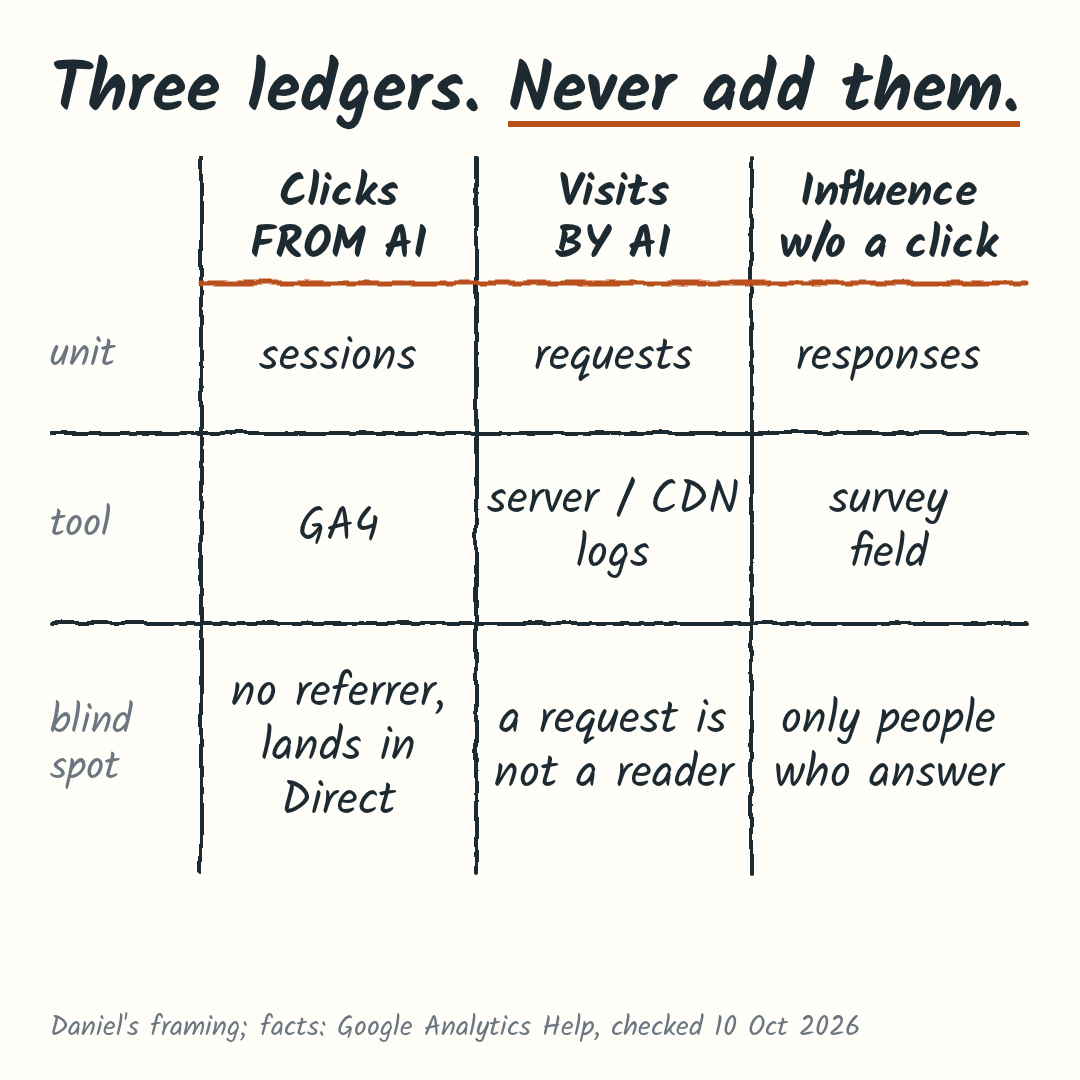
When someone asks “how much traffic do we get from ChatGPT?”, they usually mean one of three things:
- Clicks from AI. A person read an answer in an assistant and clicked through to your site. The unit is a session, counted in GA4.
- Visits by AI. A bot or an assistant fetched your page. The unit is an HTTP request, counted in server or CDN logs.
- Influence without a click. Someone saw you mentioned in an answer, didn’t click, and reached you later another way. The unit is a survey response, and you only get it by asking.
Each instrument is blind to the other two. GA4 doesn’t see a crawler that never runs your tag. Logs don’t know whether a request led to a sale. A survey only covers the people who answer.
I call these three ledgers. The framing is mine, not an industry standard, but it makes one rule easy to keep: a session, a request and a survey answer never go into one total.
Before you set anything up, write down which of the three questions you’ve been asked. That decides which tool you open.
Count human clicks from AI assistants in GA4
This is the ledger most people mean. On May 13, 2026, Google added an AI Assistant channel to the default channel group in GA4 (Google Analytics 4). When GA4 recognizes the referrer as an AI assistant, the session gets the medium ai-assistant, the channel AI Assistant and the campaign (ai-assistant).
Open the Traffic acquisition report and look for the AI Assistant row. Switch the dimension to session source / medium to see which assistant sent each session.
Google’s current channel definition names ChatGPT, Gemini, Deepseek, Copilot and Grok as examples. Treat them as examples. The page doesn’t list every recognized source, and the examples have changed since launch.
Three blind spots matter more than the row itself:
- Google’s own AI features are excluded. Clicks from AI Overviews and AI Mode stay in Organic Search.
- No referrer, no AI label. When an app or a copy-pasted link doesn’t pass a referrer, the session can land in Direct, as Search Engine Journal noted at launch. Google defines (direct)/(none) as traffic with no clear referral source. It doesn’t prove a typed URL, and it doesn’t prove an AI visit.
- Only clicks count. No click, no GA4 session.
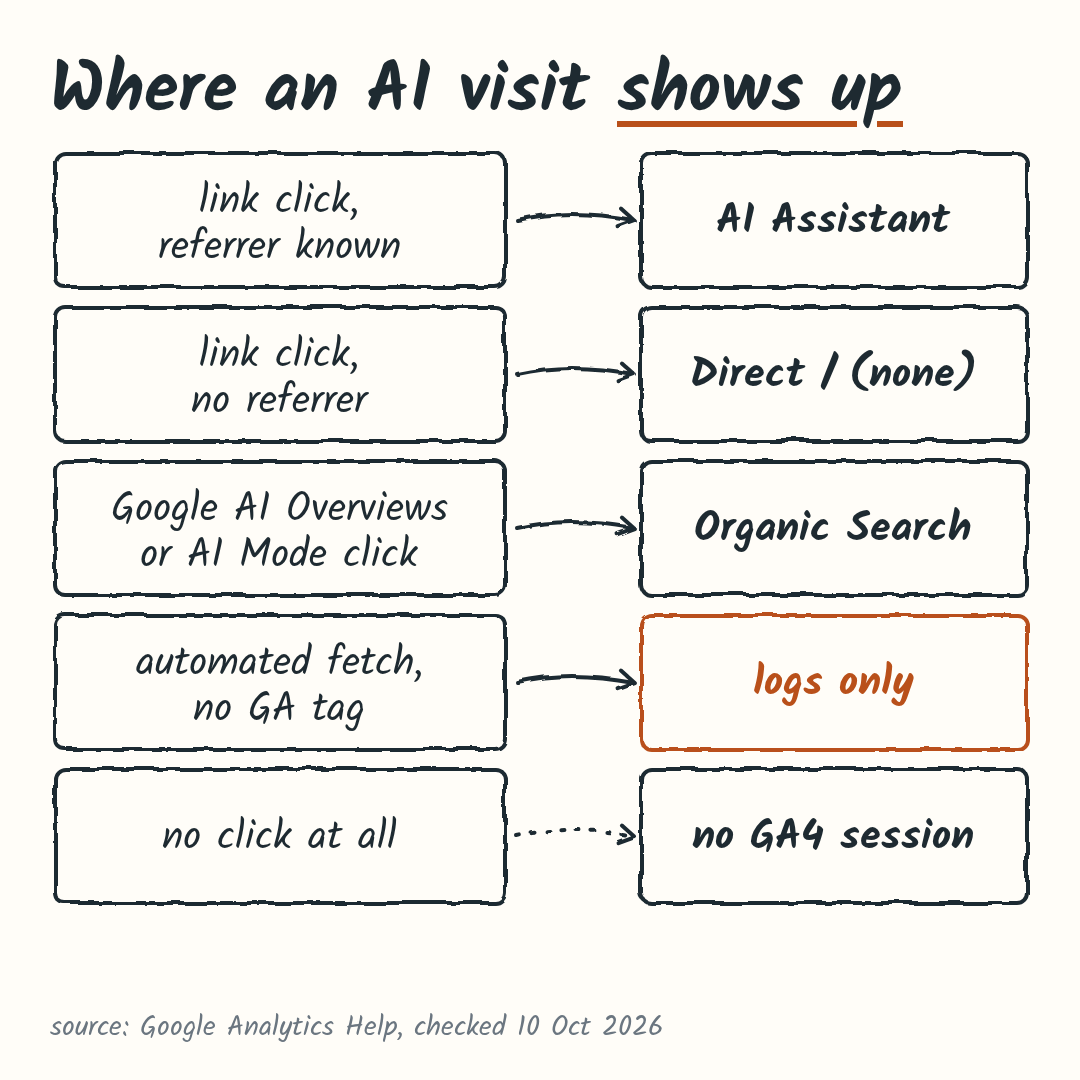
Your baseline: note whether an AI Assistant row exists, how many sessions it has, and whether any reached a key event (an action you’ve marked as a conversion).
Count AI crawlers and fetchers in your server logs
The second ledger lives outside GA4. Google says GA4 automatically excludes known bots, based on its own research and the IAB’s list, and you can’t turn that off or see how much was excluded. Crawlers that don’t run your analytics tag never reach GA4 anyway. To see which AI systems fetch your pages, you need server or CDN access logs.
The large operators now name their bots by job. The user agent string tells you which bot claims to be visiting:
| Bot type and user agents | What a log line can tell you |
|---|---|
| Training: GPTBot (OpenAI), ClaudeBot (Anthropic) | Content is being collected that may be used for model training. That’s a policy question, not traffic. |
| AI search: OAI-SearchBot (OpenAI), Claude-SearchBot (Anthropic), PerplexityBot (Perplexity) | Your pages are fetched to surface sites in that assistant’s search. It doesn’t tell you whether you were cited. |
| User-triggered: ChatGPT-User, Claude-User, Perplexity-User | A person asked the assistant to do something that fetched your page. Still one request, not a reader. |
| Google: Googlebot | Crawling for Google Search. Google-Extended is a robots.txt token, so it never appears as a user agent. |
Sources, checked on 10 Oct 2026: OpenAI, Anthropic, Perplexity, Google. Names and roles change, so check the live pages before you build filters.
Two cautions before you trust a count:
- A user agent is self-declared. Any client can send any label. OpenAI and Perplexity publish IP ranges you can check requests against. Keep unverified hits in their own bucket.
- Requests aren’t readers or citations. A pile of GPTBot hits says nothing about whether ChatGPT mentioned you to anyone.
If your host or CDN already keeps access logs, filter one week by these user agents and count requests per agent, path and status code. If you don’t have logs, I wouldn’t build a logging setup for this unless your question is about crawler access or load.
Ask people about influence that never became a click
The third ledger covers what neither GA4 nor logs can see: someone reads about you in an assistant, doesn’t click, and comes back later through search, Direct or a referral. The only honest instrument is a question.
Add one optional field to a form that already matters, like your contact or quote form: “How did you hear about us?” Keep the options neutral and include “AI assistant (ChatGPT, Gemini, etc.)” and “Other / not sure”, so nobody has to guess.
When you report it:
- Give the count with its denominator: “X of the Y people who answered”.
- Don’t extrapolate to all visitors. People who answer aren’t a random sample.
- Call it self-reported influence. It’s what people remember, not proof of cause.
- Treat brand-search growth as context only. It can rise for many reasons.
If one of your forms gets real submissions, that’s where the field goes. If none do, skip this ledger for now.
What not to conclude from small numbers
A fair objection: “Just use an AI visibility tool, or the new GA4 channel, and be done.” Tools and CDN dashboards are useful, and once a real decision depends on the numbers, I’d use them.
But neither fixes the unit problem. The GA4 channel still counts only clicks with a recognized referrer, leaves out AI Overviews and AI Mode, and can’t see visits that land in Direct. A tool gives you another number, and that number is still one of the three units with its own blind spots. For many small sites I’d expect the volume to be too low to support a conclusion, let alone a purchase.
So I wouldn’t:
- add sessions, requests and survey answers into one “AI traffic” total
- read Direct as AI
- count crawls as visitors
- call a trend from a handful of sessions. Write “inconclusive”, keep the baseline and look again next month.
What “small numbers” looks like
Picture an established local business site with about 1,500 sessions a month. GA4 shows 6 sessions in the AI Assistant channel this month, and one of them submits the contact form. That’s real data, but it isn’t a trend: at that volume, next month could easily be 3 or 9 with nothing changing. Report it as “6 AI Assistant sessions, 1 key event, inconclusive”, keep it as your baseline, and compare the same months over time before you decide anything.
Before you share any AI number, write its unit and its denominator next to it.
Which ledger to set up first
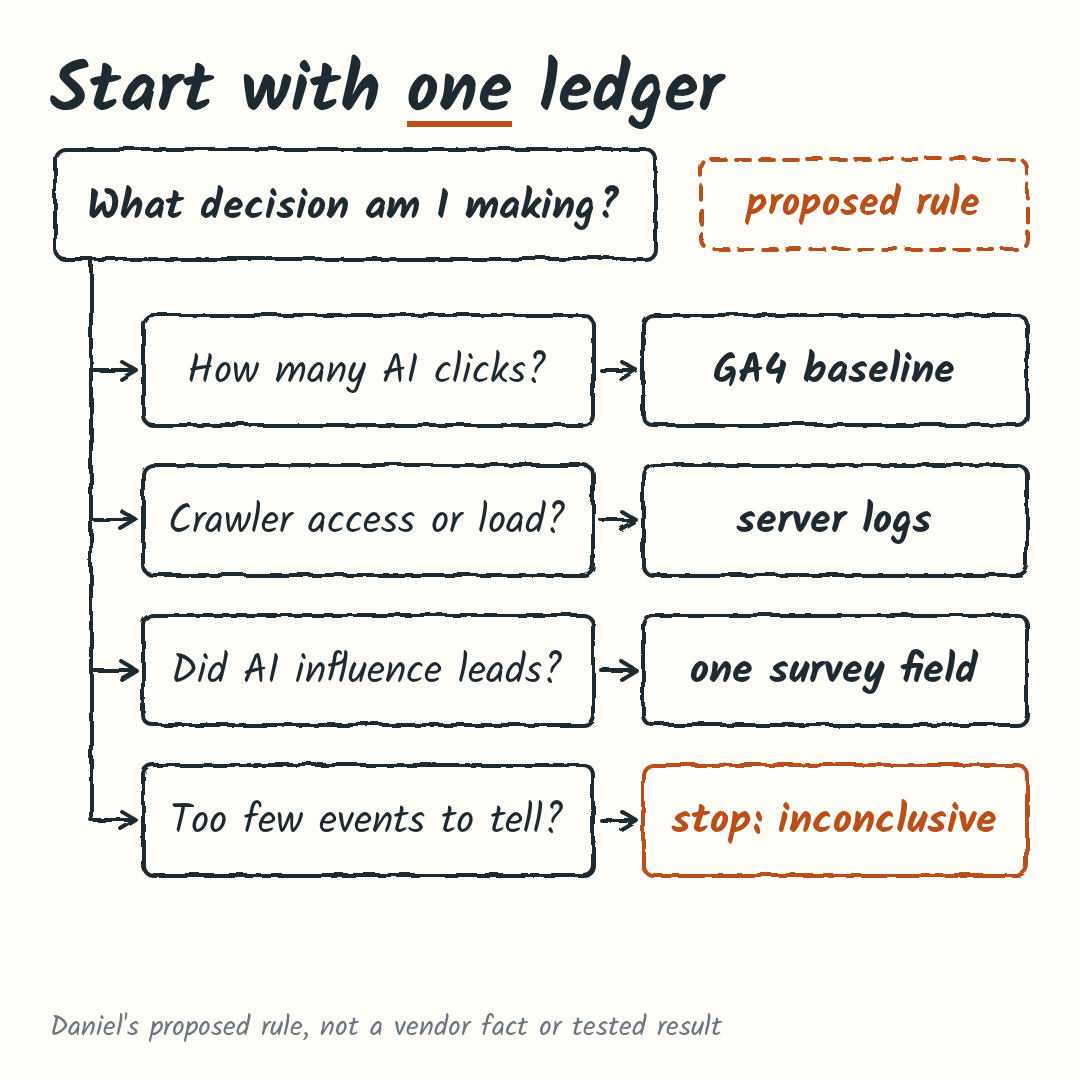
This is my proposed rule for small and mid-size sites. It’s my own synthesis, not a vendor guideline, and I haven’t tested it across a set of sites.
- Start with GA4. Record the AI Assistant row, any AI referrals visible in session source / medium, and the key events they reach. You likely have this already.
- Add logs if your question is crawler access, server load or content policy, and only if your host or CDN already keeps them. Count verified requests by agent, path and status.
- Add one survey field if your question is whether AI influenced leads or customers. Put it on a form that already gets submissions.
- Move to dedicated tools only when volume and a decision justify it, for example steady AI sessions reaching key events, crawl volume that affects your infrastructure, or enough survey answers to change a customer journey. Otherwise stop, keep the baseline and call it inconclusive.
When this rule doesn’t apply
The rule assumes AI is one question among many for your site. If you run a large site with steady AI referrals, if AI crawling is already a cost or policy issue, or if AI visibility is something you sell, you’ll likely need all three ledgers running together plus dedicated tooling. And if a stakeholder insists on one number, I’d still give them three, each with its unit.
To apply the rule, name the decision you’d make differently depending on the answer. If you can’t name one, the GA4 baseline is enough for now.
Common questions
Does GA4 backfill the AI Assistant channel for older traffic?
The Google help pages I reviewed don’t say. Check a date range before May 13, 2026 in your own property and see whether AI Assistant appears, rather than assuming.
Should I block AI crawlers?
That’s a policy decision, separate from measurement. Training, search and user-triggered bots do different jobs, and each operator documents its own controls: OpenAI, Anthropic, Perplexity and Google (Google-Extended).
Do Google AI Overview clicks count as AI Assistant?
No. Google’s channel definition excludes AI Overviews and AI Mode, so those clicks stay in Organic Search.
If you’d like a second pair of eyes
Measurement is one side of this. For what AI-assisted shoppers need once they reach your site, see the last trust mile post. For how I approach measurement work more broadly, there’s my Mitsubishi analytics strategy case study.
If you have an AI Assistant row you’re unsure how to read, or someone has asked you for “the AI number”, I’m happy to look at your GA4 setup with you. Get in touch, tell me which of the three questions you’re trying to answer, and we’ll start there.