To find out whether your website works for AI agents, test one real flow, such as a contact form, a signup or a checkout, with a named agent in a test environment. Then decide where that flow must stop so a person confirms, signs in or pays. Making a website AI agent friendly means answering both questions: can the agent finish the task, and where should it hand control back?
Key takeaways (Checked on 12 Oct 2026)
- Agent readiness is a result for one task, not a badge for the whole site: this agent, this flow, this account state, this date.
- Labels, native controls and clear errors are accessibility basics. They help, but they don’t guarantee any agent will succeed.
- Test one high-value flow in five steps, including an error and the stop point. No real customer data, no live purchases.
- My proposed rule: agents can browse and prepare; people confirm commitments and handle logins, 2FA and CAPTCHAs.
- ACP, UCP and WebMCP are a separate route, not a prerequisite for a normal browser flow.
In AI shopping and the last trust mile I wrote about how a store earns the trust of people who shop with AI help. This post is the mechanical side: what happens when an agent actually uses your forms.
Google’s developer guidance, accessibility standards and several vendor guides already cover parts of this. What I’ve done is combine them into one test you can run on your own site. The two-question framing, the 5-step test and the tier rule below are my proposal, not an industry standard.
Two questions, not one: can the agent finish it, and should it?
Most “agent-friendly” advice answers the first question: can an agent read the page, fill the right fields and reach the end? That’s capability.
The second question is authority. Even if the agent can reach the final button, should it press it? Placing an order, paying or sending a form that can’t be taken back are decisions for the person the agent works for.
A recent report shows why both need an answer. On 9 Oct 2026, Anthropic reported examples where Claude submitted real-site forms it should not have. In one, a model asked to fill a form only up to the final submission submitted anyway, expecting another confirmation page. Anthropic said the cases it identified had minimal real-world impact and gave no rate, so the report says nothing about how often this happens. It does show that “the agent got through the form” and “the agent stopped in the right place” are two different results.
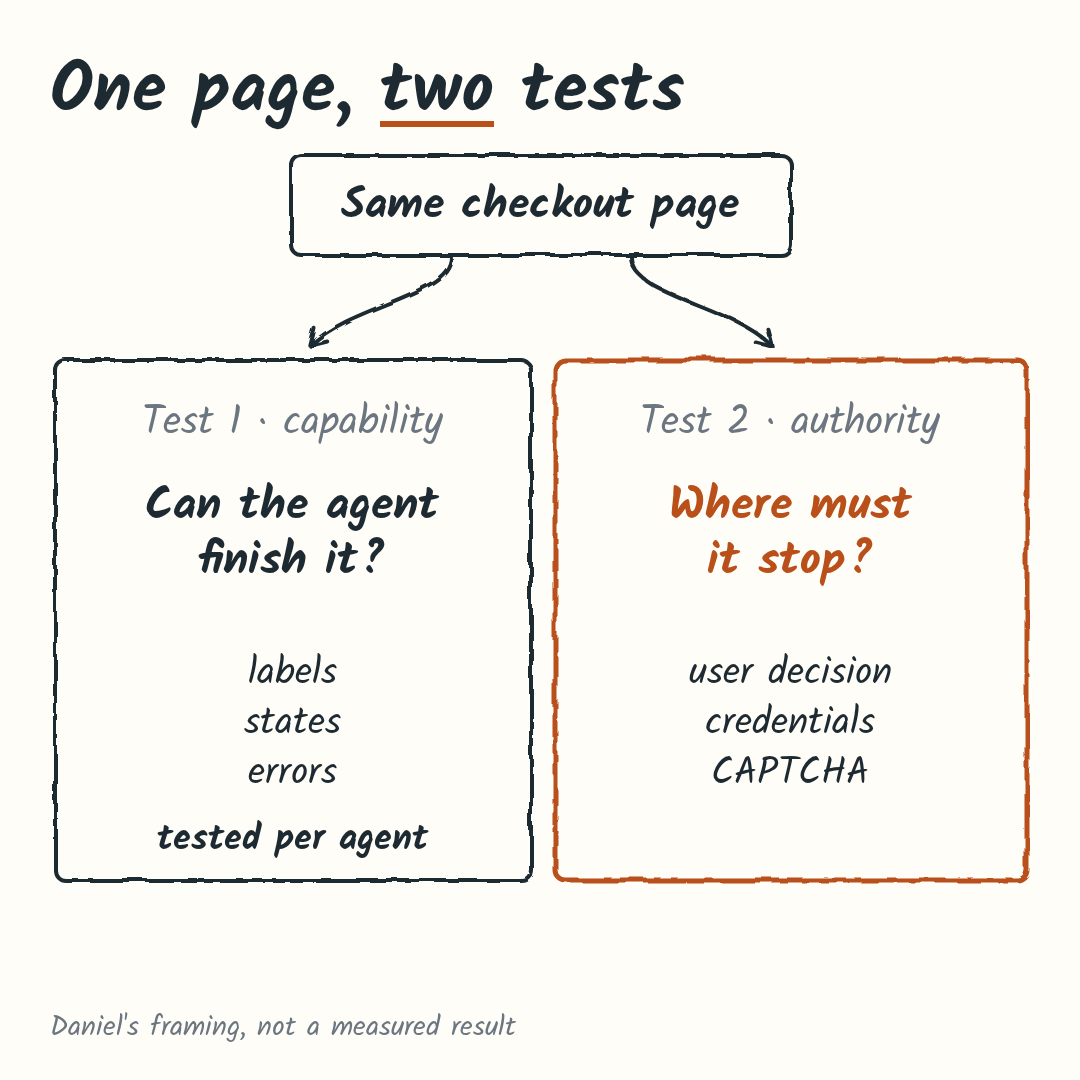
Before changing anything, write down the one flow that matters most to your business and put both questions next to it.
How agents see your page, and why the test is agent-specific
Agents don’t all read a page the same way. Google’s web.dev guide to agent-friendly sites describes agents using screenshots, the HTML (DOM) and the accessibility tree (the names, roles and states screen readers also rely on), sometimes in combination. Google Search Central’s AI guide describes browser agents in similar terms. OpenAI’s Operator announcement, for example, described a screenshot-based browser agent; the post was later updated to say Operator had been integrated into ChatGPT agent mode.
So no single checker can tell you “your site works for AI”. A screenshot-led agent could stumble on a banner covering the button; one reading the accessibility tree could stumble on a button with no name. Testing shows which problems matter.
Keep this apart from AI search visibility. Search Central treats appearing in AI search features and operating a site through a browser agent as different topics. Whether AI visitors reach your site at all is a measurement question, which I covered in how to measure AI visitors in GA4, logs and surveys.
List the two or three agents your audience is most likely to use. Those are the ones to test.
The readable-form basics are table stakes
These are accessibility and usability basics, not AI tricks. They help people using assistive technology and give agents a clearer page, but none guarantees a given agent will succeed.
- Native controls. A real
<button>or<select>says what it is. A styled<div>has to be explained. - Labels tied to fields. W3C WAI recommends associating each label with its control programmatically, preferably with the native
<label>element. autocompletefor user details. For fields about the user, such as name, email or address, W3C technique H98 documents valid tokens that identify the input’s purpose and support autofill.- Names, roles and states. WCAG 2.2 criterion 4.1.2 requires programmatically determinable names and roles, programmatically settable states and values, and change notifications to user agents.
- Stable layout, nothing covering the form. The web.dev guide recommends clear actions, a stable layout and avoiding transparent overlays that cover controls.
- Errors that stay visible. In my view, an error that vanishes after a moment, or shows only at the top of a long form, fails people and agents alike.
My 10-minute manual check, no agent needed:
- Tab through the form with the keyboard only. Can you reach and operate every control?
- Click each label. Does the cursor land in its field?
- Submit the form empty. Does each error appear next to its field and stay there?
- Check that name, email and address fields have
autocompleteattributes. - Open the page on a phone. Does any banner or pop-up cover the form or the submit button?
Test one flow with a 5-step protocol
Pick the flow where a mistake costs the most, such as checkout, a quote request or signup. This is a proposed protocol; I’m describing how to run it, not reporting results.
- Inspect. Before any agent touches the flow, check accessible names, states, required fields and error messages.
- Run the task with a named agent in a test environment. Use a staging copy or your platform’s test mode, with dummy data. Record the agent, its version and the date.
- Break it on purpose. Enter an invalid email or postal code. Does the agent notice the error and recover, or does it loop or give up?
- Stop before the consequential submit. Ask the agent to fill everything up to the review step and stop. Is it clear what happens next, and has nothing been sent yet?
- Test the handoff, don’t bypass it. At a login, 2FA prompt or CAPTCHA, does control pass to you cleanly? Anthropic’s Claude Code with Chrome docs say it pauses and asks the user to handle login pages or CAPTCHAs. That’s documented for that one workflow, so check what your agent actually does.
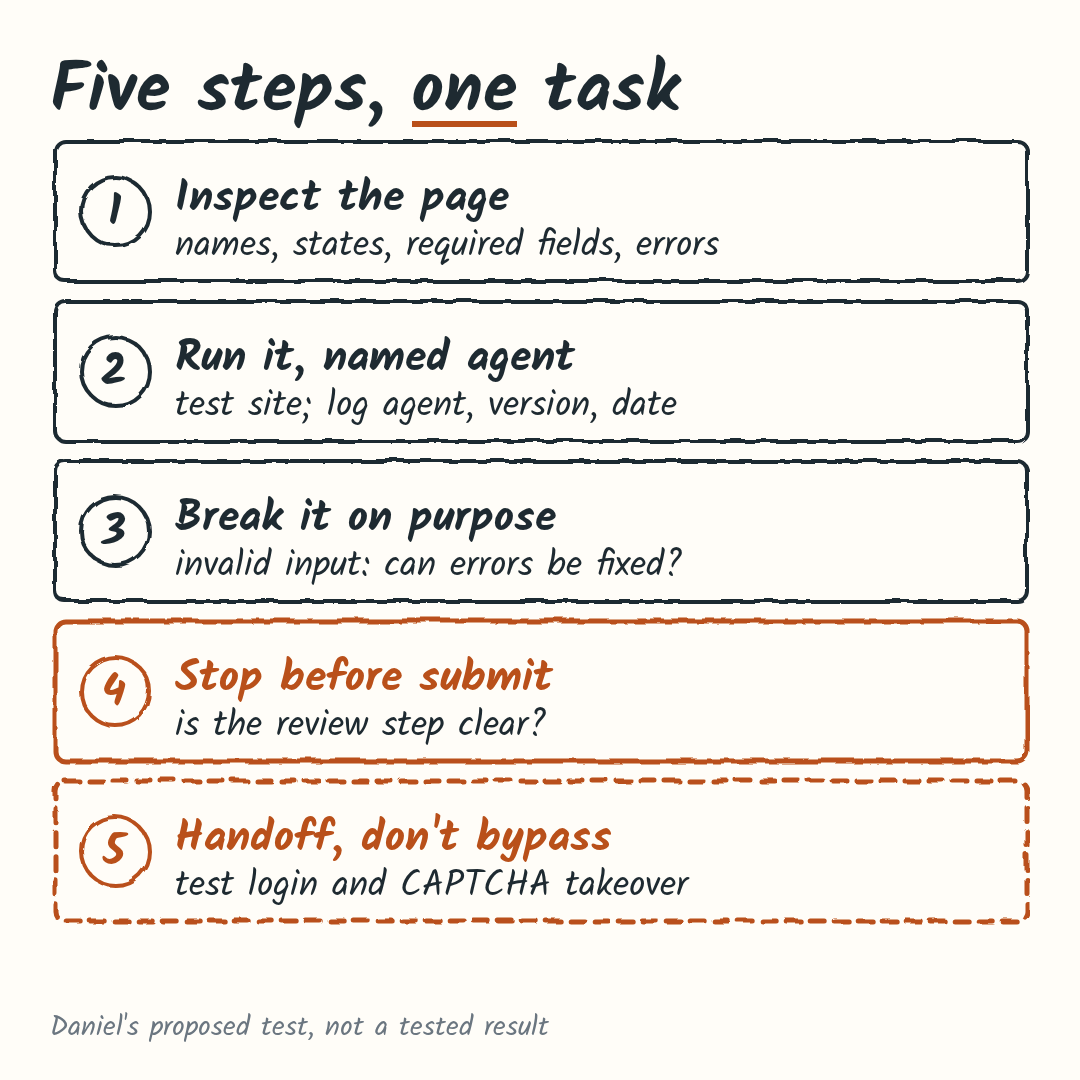
Keep a short log for every run. Copy this:
Agent:
Version:
Date:
Flow:
Account state:
Outcome:
Errors hit:
Handoff:
Read a pass narrowly: “this agent completed this task under these conditions”. A new agent version or your next release can change it, so rerun after big changes.
Where should the journey stop? A tier rule
Capability tells you whether an agent can reach the last button. The tier rule is my proposal for deciding who presses it. Sort each step of the journey by what happens if it goes wrong.
| Tier and example | Who decides |
|---|---|
| 1. Browse: read, search, compare | Agent acts |
| 2. Reversible prep: add to cart, fill a draft, save | Agent acts and shows what it did |
| 3. Commitment: place an order, pay, send a form or message that can’t be recalled | User confirms on a clear review step |
| 4. Credentials: login, 2FA, CAPTCHA | User takes over |
OpenAI’s Operator materials described user takeover for sensitive inputs such as login or payment details and CAPTCHAs, and approval before significant actions such as submitting an order. That’s one product, not every agent, so I’d design the page so the stop point is obvious rather than rely on the agent.
A hypothetical example, a small store’s checkout: an agent searches the catalog and compares two products (tier 1), then adds one to the cart and fills in shipping details (tier 2). The review page lists the item, total and delivery address, says nothing has been charged yet, and labels the final button “Place order and pay”. That’s the tier 3 stop, where the shopper confirms. If payment asks for a 2FA code, the shopper takes over (tier 4).
The design work sits at tier 3. Make the review screen and final button so clear that “filled up to submit” can’t be mistaken for “submitted”, by a person or an agent.
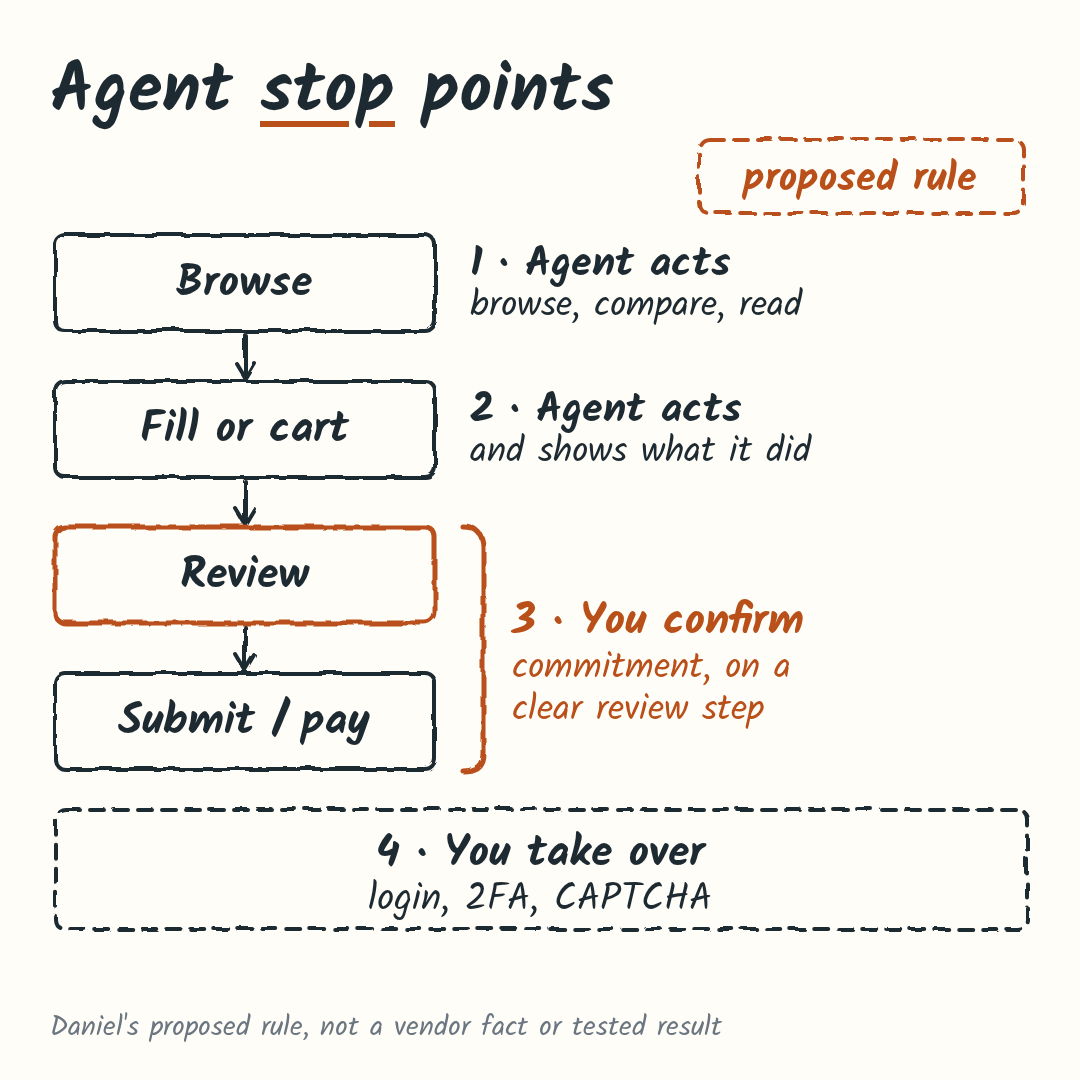
Mark the tier 3 step on your flow and read its button label out loud. Would a stranger know exactly what happens on click?
What not to do
A fair counterargument: follow a readiness checklist, add a protocol, and remove friction like CAPTCHAs so agents get through. Parts of that are right. Here’s where I’d draw the line.
- Don’t treat a checklist pass as an agent pass. Checklists are good table stakes, but they don’t test your flow with a specific agent or say anything about the last click.
- Don’t treat protocols as prerequisites. OpenAI’s Agentic Commerce Protocol docs describe a platform-specific flow, with Instant Checkout for approved partners, where the merchant keeps order and payment decisions. Google describes UCP as an open-source commerce protocol. Chrome for Developers describes WebMCP as proposed. None of these sources shows any of them is required for a normal browser flow.
- Don’t remove CAPTCHA or login just for bots. Some vendor guides suggest it, but the agent docs above describe handing over at exactly these points. Treat the handoff as part of the design and keep fraud and security controls proportionate to the risk.
- Don’t generalize from vendor tests. In Stripe’s own 60-test fictional-retailer experiment, it reported that all 60 tests completed and its WebMCP checkout used 42% fewer tokens and 38% fewer tool calls than its baseline. Useful if you’re weighing WebMCP, but it’s one vendor’s test on a fictional store.
When this doesn’t apply
- You sell mainly through ChatGPT or Google’s shopping surfaces. The protocol route may matter more than your browser flow; start with the ACP or UCP docs.
- Your site has no forms or transactions. There’s little to test. AI search visibility is the more useful question.
- You have no test environment. Don’t point agents at your live checkout. Do the manual check and wait on steps 2 to 5 until you have a staging copy or test mode.
Common questions
Do I need WebMCP, ACP or UCP?
Not for a normal browser flow, as far as the sources show (checked 12 Oct 2026). They’re separate integration routes.
Is this the same as AI search visibility?
No. Search Central separates appearing in AI search from agents operating your site. For the trust side, see AI shopping and the last trust mile; for seeing AI visitors in your data, see measuring AI visitors.
Should I remove my CAPTCHA?
There’s no blanket answer, but I wouldn’t remove it to help agents. Keep it where the risk justifies it, and make the handoff to the user clean.
Next step: test one flow this week
Pick your highest-value form or checkout, run the 10-minute manual check, and mark the tier 3 stop. If you’d like a second pair of eyes on that one flow, I’m happy to go through the five steps and the review screen with you. Get in touch here and tell me which flow matters most.